GESTURES TO ENABLE MENUS USING AUGMENTED REALITY CONTENT IN A MESSAGING SYSTEM
Tracks the positions and movements of fingers to reveal and control virtual menu objects in an augmented reality experience.
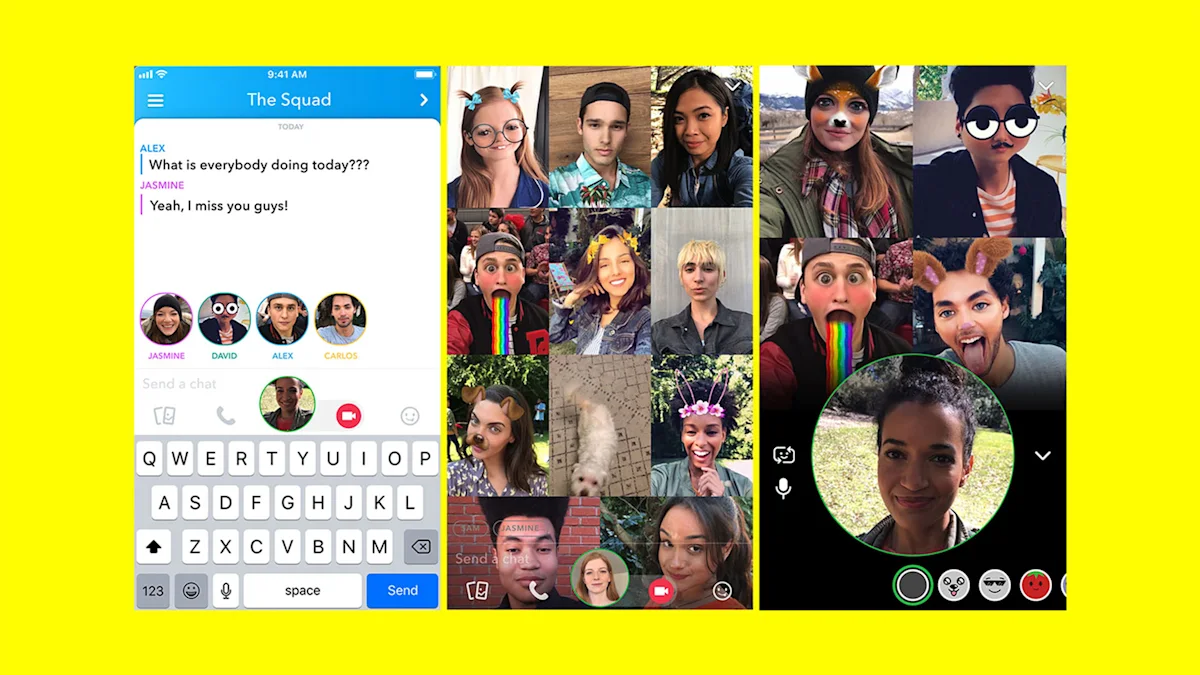
SHARED AUGMENTED REALITY EXPERIENCE IN VIDEO CHAT
A participant can activate an AR experience during a video call that adds effects to participants' faces or bodies. Multiple callers can therefore participate in the same AR experience.
VIRTUAL OBJECT MANIPULATION WITH GESTURES IN A MESSAGING SYSTEM
Uses finger gestures to select a virtual object and resize it by moving both hands. This enables direct manipulation of objects in an AR scene.
CONTEXT-BASED VIRTUAL OBJECT RENDERING
The system chooses a virtual object template and changes its appearance using contextual information from the device. It then places the customized object into the three-dimensional scene shown by the camera.
BEAUTIFICATION TECHNIQUES FOR 3D DATA IN A MESSAGING SYSTEM
Applies a beautifying effect to both a photo and its depth information. This keeps the retouching consistent when the resulting 3D Snap is rendered from different viewpoints.
CURSOR FUNCTIONALITY FOR AUGMENTED REALITY CONTENT IN MESSAGING SYSTEMS
Turns a finger visible to the camera into a virtual cursor. When that cursor touches a virtual object, the system changes the object's size and displays the result.
RENDERING 3D CAPTIONS WITHIN REAL-WORLD ENVIRONMENTS
Users type a caption and preview it as three-dimensional text positioned in the camera's real-world scene. The resulting Snap includes the text at that spatial position.
AUTO TRIMMING FOR AUGMENTED REALITY CONTENT IN MESSAGING SYSTEMS
Detects a gesture in recorded footage and uses it to mark a cut point. It automatically selects clip boundaries and produces a trimmed video for preview.
SHOOTING INTERACTION USING AUGMENTED REALITY CONTENT IN A MESSAGING SYSTEM
Recognizes a finger moving from an open to a closed trigger gesture and launches a virtual object from its position. The object's direction follows the tracked finger orientation.
GENERATING 3D DATA IN A MESSAGING SYSTEM
Applies a selected 3D effect using both captured imagery and depth information. It packages the effect and capture data into a message so the resulting 3D Snap can be shared.
VIRTUAL SURFACE MODIFICATION
The camera identifies a real-world surface and applies an effect only within its boundaries. The altered surface remains positioned in the scene rather than appearing as a flat screen overlay.
TRIGGER GESTURE FOR SELECTION OF AUGMENTED REALITY CONTENT IN MESSAGING SYSTEMS
Tracks an open finger gesture to position a virtual interaction object. Closing the gesture after contact selects another virtual object and attaches the interaction object to it.
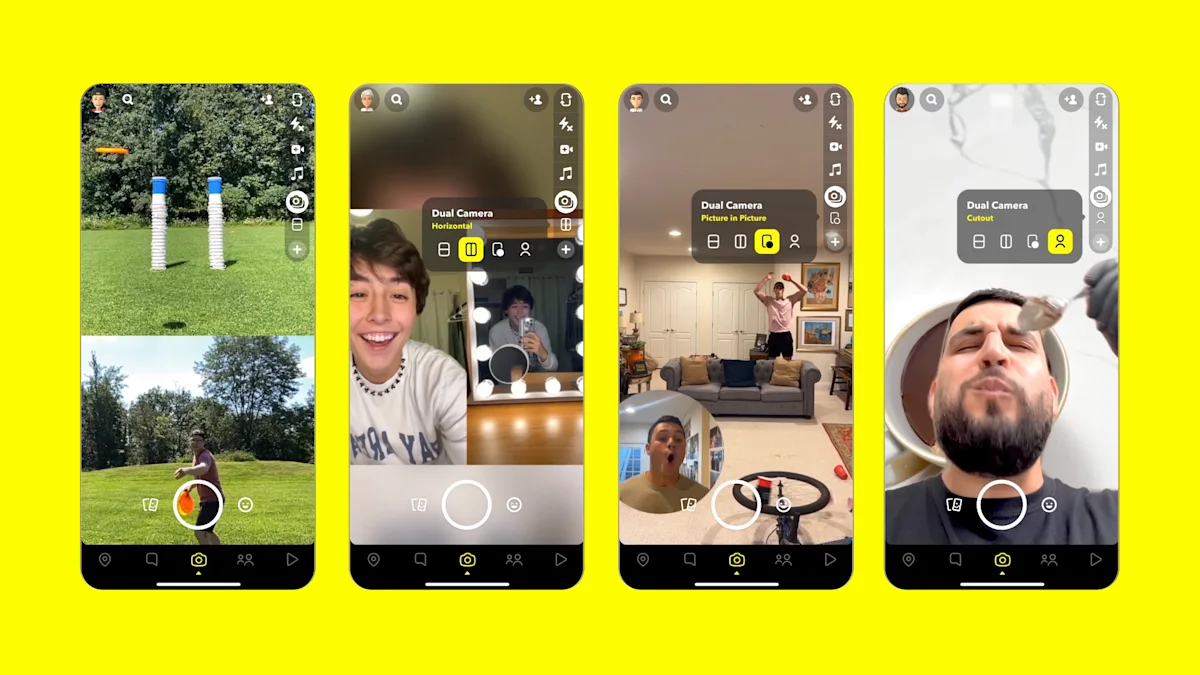
AUGMENTED REALITY EXPERIENCES WITH DUAL CAMERAS
One camera captures a real-world object's textures while the other simultaneously captures a target object. Snapchat applies those textures to the target as an AR effect in the second camera's image.
EFFECTS FOR 3D DATA IN A MESSAGING SYSTEM
Offers compatible 3D effects and applies the selected effect to captured images using depth information. This lets virtual effects respond to the scene's three-dimensional structure.
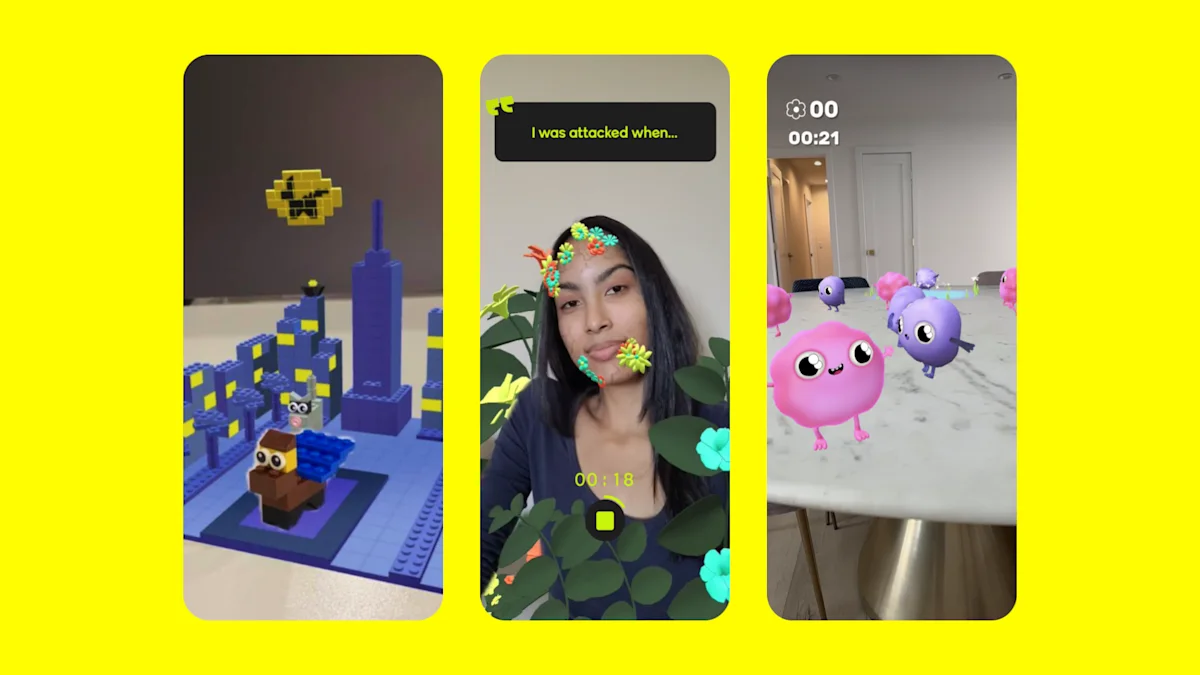
AUGMENTED REALITY CONTENT GENERATORS INCLUDING 3D DATA IN A MESSAGING SYSTEM
Users choose a 3D effect from a carousel and apply it to media containing both imagery and depth information. The resulting effect-enhanced media can then be sent as a message.
3D CAPTIONS WITH FACE TRACKING
Snapchat detects a face in the live camera feed and places a three-dimensional caption beside it. Face tracking provides the reference for positioning the caption.
RENDERING 3D CAPTIONS WITHIN REAL-WORLD ENVIRONMENTS
Users type a caption and preview it as three-dimensional text positioned in the camera's real-world scene. The resulting Snap includes the text at that spatial position.
SHOOTING INTERACTION USING AUGMENTED REALITY CONTENT IN A MESSAGING SYSTEM
Recognizes a finger moving from an open to a closed trigger gesture and launches a virtual object from its position. The object's direction follows the tracked finger orientation.
SHARED AUGMENTED REALITY EXPERIENCE IN VIDEO CHAT
A participant can activate an AR experience during a video call that adds effects to participants' faces or bodies. Multiple callers can therefore participate in the same AR experience.
VIRTUAL OBJECT MANIPULATION WITH GESTURES IN A MESSAGING SYSTEM
Uses finger gestures to select a virtual object and resize it by moving both hands. This enables direct manipulation of objects in an AR scene.
3D CAPTIONS WITH SEMANTIC GRAPHICAL ELEMENTS
A user adds a 3D caption to the camera feed, and the app pairs it with a relevant graphic positioned in 3D near the user's face.
EFFECTS FOR 3D DATA IN A MESSAGING SYSTEM
Offers compatible 3D effects and applies the selected effect to captured images using depth information. This lets virtual effects respond to the scene's three-dimensional structure.
3D OBJECT CAMERA CUSTOMIZATION SYSTEM
Users customize a virtual object's surface with imagery captured by their camera. The customized object can be saved and placed into a different camera scene later.
3D CAPTIONS WITH FACE TRACKING
Snapchat detects a face in the live camera feed and places a three-dimensional caption beside it. Face tracking provides the reference for positioning the caption.
VIRTUAL OBJECT MANIPULATION WITH GESTURES IN A MESSAGING SYSTEM
Uses finger gestures to select a virtual object and resize it by moving both hands. This enables direct manipulation of objects in an AR scene.
GESTURES TO ENABLE MENUS USING AUGMENTED REALITY CONTENT IN A MESSAGING SYSTEM
Tracks the positions and movements of fingers to reveal and control virtual menu objects in an augmented reality experience.
TRIGGER GESTURE FOR SELECTION OF AUGMENTED REALITY CONTENT IN MESSGING SYSTEMS
Uses a gesture to trigger selection of an AR experience in the messaging application. The available title does not specify whether the gesture is a touch action or a camera-recognized movement.
SHOOTING INTERACTION USING AUGMENTED REALITY CONTENT IN A MESSAGING SYSTEM
Recognizes a finger moving from an open to a closed trigger gesture and launches a virtual object from its position. The object's direction follows the tracked finger orientation.
AUTO TRIMMING FOR AUGMENTED REALITY CONTENT IN MESSAGING SYSTEMS
Detects a gesture in recorded footage and uses it to mark a cut point. It automatically selects clip boundaries and produces a trimmed video for preview.
3D CURSOR FUNCTIONALITY FOR AUGMENTED REALITY CONTENT IN MESSAGING SYSTEMS
Turns a tracked finger into a virtual cursor that interacts with AR objects. Finger collisions change object dimensions, and the updated objects appear in the rendered scene.
CURSOR FUNCTIONALITY FOR AUGMENTED REALITY CONTENT IN MESSAGING SYSTEMS
Turns a finger visible to the camera into a virtual cursor. When that cursor touches a virtual object, the system changes the object's size and displays the result.
AUGMENTED REALITY CONTENT GENERATORS INCLUDING 3D DATA IN A MESSAGING SYSTEM
Users choose a 3D effect from a carousel and apply it to media containing both imagery and depth information. The resulting effect-enhanced media can then be sent as a message.
BEAUTIFICATION TECHNIQUES FOR 3D DATA IN A MESSAGING SYSTEM
Applies a beautifying effect to both a photo and its depth information. This keeps the retouching consistent when the resulting 3D Snap is rendered from different viewpoints.
GENERATING 3D DATA IN A MESSAGING SYSTEM
Applies a selected 3D effect using both captured imagery and depth information. It packages the effect and capture data into a message so the resulting 3D Snap can be shared.
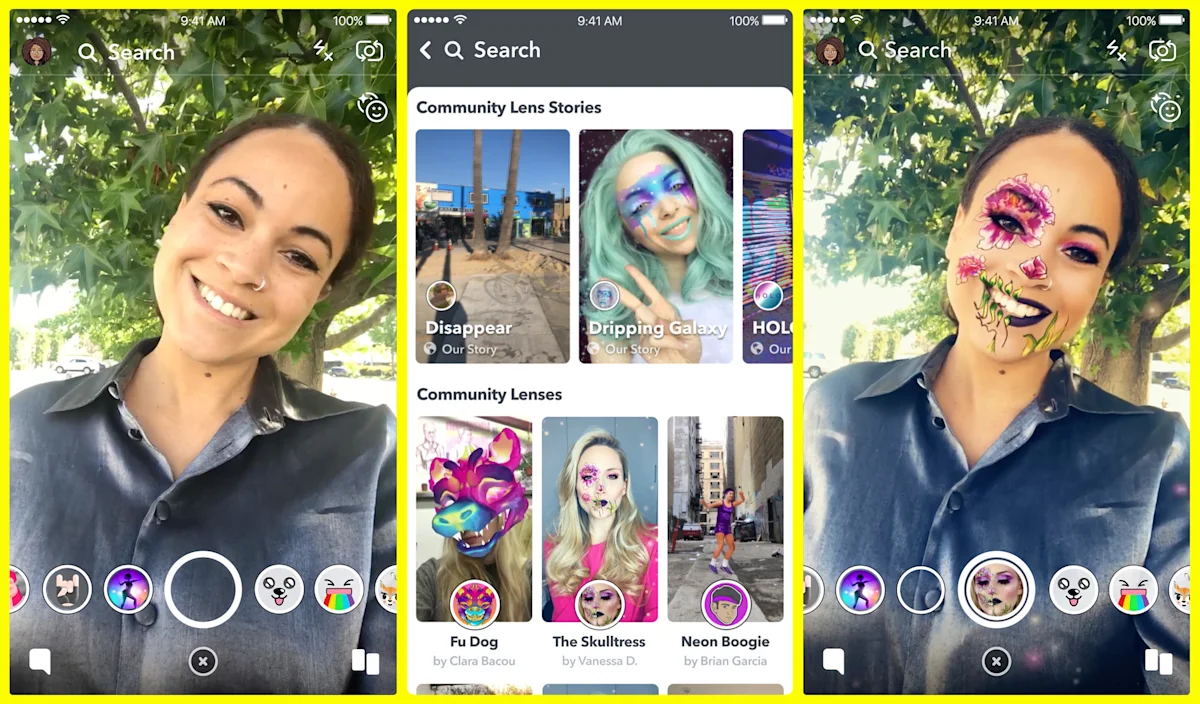
DIY EFFECTS IMAGE MODIFICATION
Users activate a customizable effects mode beside their camera image. A nearby palette of effect options lets them choose and apply an effect directly to that image.
PROVIDING 3D DATA FOR MESSAGES IN A MESSAGING SYSTEM
Estimates depth from a camera image using a machine-learning model. It combines that depth with the image to apply the user's selected 3D effect.
AUGMENTED REALITY EXPERIENCES WITH DUAL CAMERAS
One camera captures a real-world object's textures while the other simultaneously captures a target object. Snapchat applies those textures to the target as an AR effect in the second camera's image.
SHARED AUGMENTED REALITY EXPERIENCE IN VIDEO CHAT
A participant can activate an AR experience during a video call that adds effects to participants' faces or bodies. Multiple callers can therefore participate in the same AR experience.
3D CAPTIONS WITH SEMANTIC GRAPHICAL ELEMENTS
A user adds a 3D caption to the camera feed, and the app pairs it with a relevant graphic positioned in 3D near the user's face.
3D PAINT EFFECTS IN A MESSAGING SYSTEM
Moving the phone traces a path through the camera scene, which becomes a customizable three-dimensional paint stroke. Users can capture and send a Snap containing the resulting AR artwork.
RENDERING 3D CAPTIONS WITHIN REAL-WORLD ENVIRONMENTS
Users type a caption and preview it as three-dimensional text positioned in the camera's real-world scene. The resulting Snap includes the text at that spatial position.
AUGMENTED REALITY CONTENT GENERATORS INCLUDING 3D DATA IN A MESSAGING SYSTEM
Users choose a 3D effect from a carousel and apply it to media containing both imagery and depth information. The resulting effect-enhanced media can then be sent as a message.
VIRTUAL SURFACE MODIFICATION
The camera identifies a real-world surface and applies an effect only within its boundaries. The altered surface remains positioned in the scene rather than appearing as a flat screen overlay.
PROVIDING 3D DATA FOR MESSAGES IN A MESSAGING SYSTEM
Estimates depth from a camera image using a machine-learning model. It combines that depth with the image to apply the user's selected 3D effect.
EFFECTS FOR 3D DATA IN A MESSAGING SYSTEM
Offers compatible 3D effects and applies the selected effect to captured images using depth information. This lets virtual effects respond to the scene's three-dimensional structure.
SHOOTING INTERACTION USING AUGMENTED REALITY CONTENT IN A MESSAGING SYSTEM
Recognizes a finger moving from an open to a closed trigger gesture and launches a virtual object from its position. The object's direction follows the tracked finger orientation.
CURSOR FUNCTIONALITY FOR AUGMENTED REALITY CONTENT IN MESSAGING SYSTEMS
Turns a finger visible to the camera into a virtual cursor. When that cursor touches a virtual object, the system changes the object's size and displays the result.
GESTURES TO ENABLE MENUS USING AUGMENTED REALITY CONTENT IN A MESSAGING SYSTEM
Tracks the positions and movements of fingers to reveal and control virtual menu objects in an augmented reality experience.
3D CURSOR FUNCTIONALITY FOR AUGMENTED REALITY CONTENT IN MESSAGING SYSTEMS
Turns a tracked finger into a virtual cursor that interacts with AR objects. Finger collisions change object dimensions, and the updated objects appear in the rendered scene.
TRIGGER GESTURE FOR SELECTION OF AUGMENTED REALITY CONTENT IN MESSAGING SYSTEMS
Tracks an open finger gesture to position a virtual interaction object. Closing the gesture after contact selects another virtual object and attaches the interaction object to it.
VIRTUAL OBJECT MANIPULATION WITH GESTURES IN A MESSAGING SYSTEM
Uses finger gestures to select a virtual object and resize it by moving both hands. This enables direct manipulation of objects in an AR scene.
AUTO TRIMMING FOR AUGMENTED REALITY CONTENT IN MESSAGING SYSTEMS
Detects a gesture in recorded footage and uses it to mark a cut point. It automatically selects clip boundaries and produces a trimmed video for preview.
3D OBJECT CAMERA CUSTOMIZATION SYSTEM
Users customize a virtual object's surface with imagery captured by their camera. The customized object can be saved and placed into a different camera scene later.
BEAUTIFICATION TECHNIQUES FOR 3D DATA IN A MESSAGING SYSTEM
Applies a beautifying effect to both a photo and its depth information. This keeps the retouching consistent when the resulting 3D Snap is rendered from different viewpoints.
DIY EFFECTS IMAGE MODIFICATION
Users activate a customizable effects mode beside their camera image. A nearby palette of effect options lets them choose and apply an effect directly to that image.
AUGMENTED REALITY EXPERIENCES WITH DUAL CAMERAS
One camera captures a real-world object's textures while the other simultaneously captures a target object. Snapchat applies those textures to the target as an AR effect in the second camera's image.
SHARED AUGMENTED REALITY EXPERIENCE IN VIDEO CHAT
A participant can activate an AR experience during a video call that adds effects to participants' faces or bodies. Multiple callers can therefore participate in the same AR experience.
3D CAPTIONS WITH FACE TRACKING
Snapchat detects a face in the live camera feed and places a three-dimensional caption beside it. Face tracking provides the reference for positioning the caption.
3D CUTOUT IMAGE MODIFICATION
Enables a cutout control when a suitable object is detected, removes that object from its background, and inserts it into another image as a virtual object.
3D CAPTIONS WITH SEMANTIC GRAPHICAL ELEMENTS
A user adds a 3D caption to the camera feed, and the app pairs it with a relevant graphic positioned in 3D near the user's face.
CONTEXT-BASED VIRTUAL OBJECT RENDERING
The system chooses a virtual object template and changes its appearance using contextual information from the device. It then places the customized object into the three-dimensional scene shown by the camera.
GENERATING 3D DATA IN A MESSAGING SYSTEM
Applies a selected 3D effect using both captured imagery and depth information. It packages the effect and capture data into a message so the resulting 3D Snap can be shared.
3D PAINT EFFECTS IN A MESSAGING SYSTEM
Moving the phone traces a path through the camera scene, which becomes a customizable three-dimensional paint stroke. Users can capture and send a Snap containing the resulting AR artwork.
RENDERING 3D CAPTIONS WITHIN REAL-WORLD ENVIRONMENTS
Users type a caption and preview it as three-dimensional text positioned in the camera's real-world scene. The resulting Snap includes the text at that spatial position.
AUGMENTED REALITY CONTENT GENERATORS INCLUDING 3D DATA IN A MESSAGING SYSTEM
Users choose a 3D effect from a carousel and apply it to media containing both imagery and depth information. The resulting effect-enhanced media can then be sent as a message.
AUGMENTED REALITY CONTENT GENERATORS INCLUDING 3D DATA IN A MESSAGING SYSTEM
Users choose a 3D effect from a carousel and apply it to media containing both imagery and depth information. The resulting effect-enhanced media can then be sent as a message.
3D CUTOUT IMAGE MODIFICATION
Enables a cutout control when a suitable object is detected, removes that object from its background, and inserts it into another image as a virtual object.
3D OBJECT CAMERA CUSTOMIZATION SYSTEM
Users customize a virtual object's surface with imagery captured by their camera. The customized object can be saved and placed into a different camera scene later.
DIY EFFECTS IMAGE MODIFICATION
Users activate a customizable effects mode beside their camera image. A nearby palette of effect options lets them choose and apply an effect directly to that image.
CONTEXT-BASED VIRTUAL OBJECT RENDERING
The system chooses a virtual object template and changes its appearance using contextual information from the device. It then places the customized object into the three-dimensional scene shown by the camera.
BEAUTIFICATION TECHNIQUES FOR 3D DATA IN A MESSAGING SYSTEM
Applies a beautifying effect to both a photo and its depth information. This keeps the retouching consistent when the resulting 3D Snap is rendered from different viewpoints.
GENERATING 3D DATA IN A MESSAGING SYSTEM
Applies a selected 3D effect using both captured imagery and depth information. It packages the effect and capture data into a message so the resulting 3D Snap can be shared.
GENERATING 3D DATA IN A MESSAGING SYSTEM
Applies a selected 3D effect using both captured imagery and depth information. It packages the effect and capture data into a message so the resulting 3D Snap can be shared.
EFFECTS FOR 3D DATA IN A MESSAGING SYSTEM
Offers compatible 3D effects and applies the selected effect to captured images using depth information. This lets virtual effects respond to the scene's three-dimensional structure.
PROVIDING 3D DATA FOR MESSAGES IN A MESSAGING SYSTEM
Estimates depth from a camera image using a machine-learning model. It combines that depth with the image to apply the user's selected 3D effect.
3D OBJECT CAMERA CUSTOMIZATION SYSTEM
Users customize a virtual object's surface with imagery captured by their camera. The customized object can be saved and placed into a different camera scene later.
DIY EFFECTS IMAGE MODIFICATION
Users activate a customizable effects mode beside their camera image. A nearby palette of effect options lets them choose and apply an effect directly to that image.
3D CUTOUT IMAGE MODIFICATION
Enables a cutout control when a suitable object is detected, removes that object from its background, and inserts it into another image as a virtual object.
3D PAINT EFFECTS IN A MESSAGING SYSTEM
Moving the phone traces a path through the camera scene, which becomes a customizable three-dimensional paint stroke. Users can capture and send a Snap containing the resulting AR artwork.
CONTEXT-BASED VIRTUAL OBJECT RENDERING
The system chooses a virtual object template and changes its appearance using contextual information from the device. It then places the customized object into the three-dimensional scene shown by the camera.
VIRTUAL SURFACE MODIFICATION
The camera identifies a real-world surface and applies an effect only within its boundaries. The altered surface remains positioned in the scene rather than appearing as a flat screen overlay.
VIRTUAL SURFACE MODIFICATION
The camera identifies a real-world surface and applies an effect only within its boundaries. The altered surface remains positioned in the scene rather than appearing as a flat screen overlay.
3D CAPTIONS WITH SEMANTIC GRAPHICAL ELEMENTS
A user adds a 3D caption to the camera feed, and the app pairs it with a relevant graphic positioned in 3D near the user's face.
3D CAPTIONS WITH FACE TRACKING
Snapchat detects a face in the live camera feed and places a three-dimensional caption beside it. Face tracking provides the reference for positioning the caption.
RENDERING 3D CAPTIONS WITHIN REAL-WORLD ENVIRONMENTS
Users type a caption and preview it as three-dimensional text positioned in the camera's real-world scene. The resulting Snap includes the text at that spatial position.
3D OBJECT CAMERA CUSTOMIZATION SYSTEM
Users customize a virtual object's surface with imagery captured by their camera. The customized object can be saved and placed into a different camera scene later.