LOCATION-AGNOSTIC CONTENT ACCESS MECHANISMS FOR MAP-BASED INTERFACES
Users can open a friend's content from the map, a friend panel, or search even when that friend's location is outside the area currently displayed. Moving the map does not change which content belongs to that friend.
LOCATION VISIBILITY MECHANISMS FOR MAP-BASED SOCIAL MEDIA GRAPHICAL USER INTERFACE
Users can hide their location from others while continuing to see themselves and friends on the map. Sharing permissions can also be configured for groups or individual friends.
SERVER-MANAGED LOCATION-BASED SOCIAL MEDIA GALLERIES
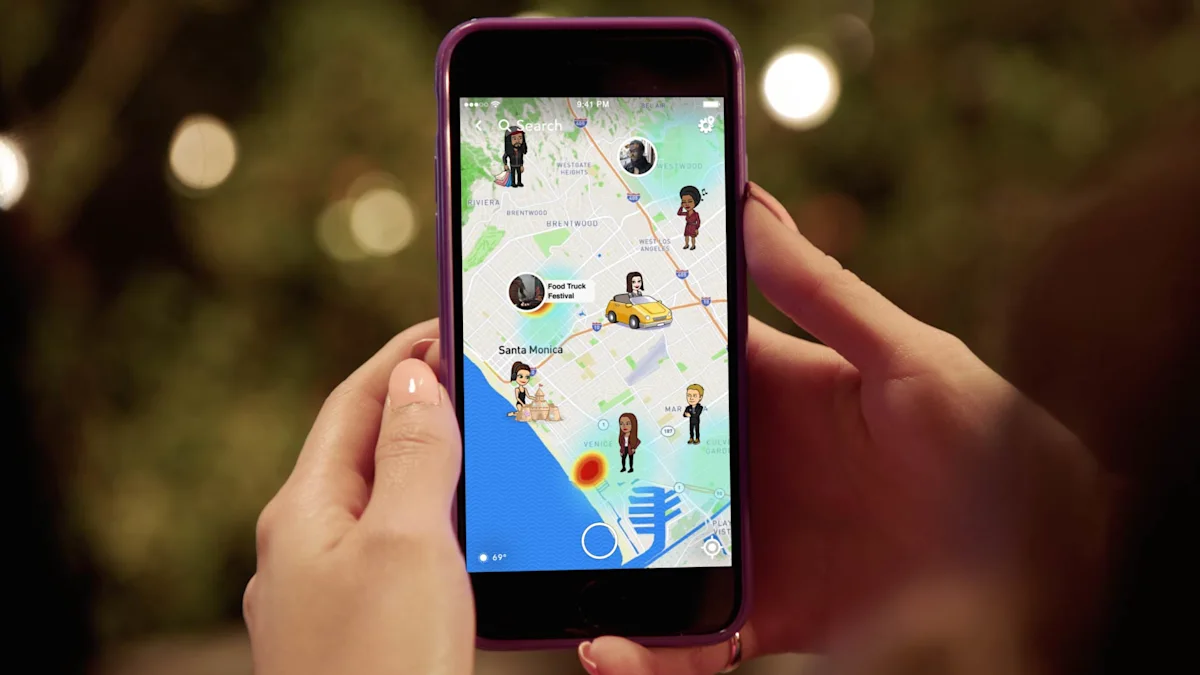
People tap a thumbnail at a location on Snap Map to watch a full-screen sequence of Snaps collected from that location. Each Snap advances automatically after its viewing duration.
GESTURE-BASED INTERACTIVE MAP INTERFACE FOR MEDIA CONTENT
Users pinch to zoom and drag to pan a map containing location-based media galleries. Each gallery icon stays associated with its geographic location.
DUAL-CONFIGURATION MAP-BASED GRAPHICAL USER INTERFACE
Lets users switch between a live map of public Snaps and a private map of their own past Snaps. The historical view retains access to personal content after its public viewing period expires.
MESSAGING INTEGRATION IN MAP-BASED PLATFORM INTERFACES
Tapping a friend's avatar on Snap Map opens a panel with their information and messaging controls. Users can send a message without leaving the map.
MAP INTERFACE WITH STORY ACCESS VIA MAP-DISPLAYED FRIEND ICONS
Lets users open a friend's Story by tapping their avatar on Snap Map or selecting it through a friend panel. After viewing, the map returns to its previous position and zoom.
LOCATION-BASED MEDIA CONTENT AGGREGATION AND MAP-BASED ACCESS
Automatically groups submitted Snaps into location-based galleries and places selectable gallery icons on a map. Selecting an icon plays the gallery as a sequence, while new submissions enter and expired items leave automatically.
CONTENT AND ICON REPRESENTATION VIA DUAL ICON TYPES IN A MAP INTERFACE
Shows friend locations and local content using different map symbols. Friend markers move with location updates, while content markers stay anchored to their capture locations and disappear when their content expires.
CONFIGURING A 3D MODEL WITHIN A VIRTUAL CONFERENCING SYSTEM
Lets someone configure a 3D object inside a virtual meeting room and choose imagery to project onto it. Participants then see the configured object during the meeting.
SEARCH MECHANISM WITH DYNAMICALLY VARIABLE SEARCH PERIOD
Lets users search public Snaps around a location by pressing on the map. How long they hold the press changes the time range of the content returned.
SEARCH MECHANISM IN A GRAPHICAL USER INTERFACE
Users search public Snaps within the geographic area currently visible on Snap Map. Nearby submissions are grouped into map collections and disappear when their viewing availability expires.
SELECTIVE LOCATION-BASED IDENTITY COMMUNICATION
A user selects a display option associated with their current location. That choice changes how their location or identity appears to other users on the map.
PRESENTING CAPTURED SCREEN CONTENT WITHIN A VIRTUAL CONFERENCING SYSTEM
A room designer separately configures participant video tiles and shared-screen presentation. The conferencing system then displays the room using those saved layout settings.
PROVIDING A DOOR FOR A ROOM WITHIN A VIRTUAL CONFERENCING SYSTEM
Lets participants close or lock a virtual meeting room. Someone attempting to enter receives a notice that the room is closed or locked.
MAP-BASED GRAPHICAL USER INTERFACE FOR EPHEMERAL SOCIAL MEDIA CONTENT
Users tap locations on a map to watch collections of public Snaps contributed by different people. The system groups those Snaps using their location tags.
PRESENTING PARTICIPANT REACTIONS WITHIN A VIRTUAL WORKING ENVIRONMENT
An organizer divides participants in a virtual workspace into groups. Participants can select reaction buttons whose icons are displayed only to members of their assigned group.
AUTOMATICALLY NAVIGATING BETWEEN ROOMS WITHIN A VIRTUAL CONFERENCING SYSTEM
Lets a conference participant request permission to follow another participant between virtual rooms. Once authorized, room navigation automatically keeps them together.
DYNAMIC MAP INTERFACE GENERATION
Turns geographically located posts into map overlays showing where and when activity is happening. Spreading each post's contribution across nearby times helps reveal patterns without exposing individual posts precisely.
STYLIZED MAP TILE GENERATION AND SERVING FOR ONLINE PLATFORMS
Photographic map imagery is transformed into stylized tiles and delivered for the area a user is viewing. Processing neighboring tiles together helps avoid visible seams, while different models accommodate different zoom levels.
RECREATING KEYBOARD AND MOUSE SOUNDS WITHIN VIRTUAL WORKING ENVIRONMENT
Recreates a participant's typing and mouse-click sounds for selected coworkers in a virtual workspace. It sends input timing rather than requiring the original sounds to be captured by a microphone.
ACTIVITY METRIC-BASED VISUAL VARIATION OF SELECTABLE GUI ELEMENTS
Selectable icons for collections of social posts change appearance according to the activity behind each collection. This lets users distinguish more active collections before opening them.
MAP-BASED GRAPHICAL USER INTERFACE INDICATING GEOSPATIAL ACTIVITY METRICS
Shows where people are posting Snaps on a map. Heatmap colors indicate areas with concentrated or unusually high posting activity.
PRESENTING PARTICIPANT REACTIONS WITHIN A VIRTUAL WORKING ENVIRONMENT
An organizer divides participants in a virtual workspace into groups. Participants can select reaction buttons whose icons are displayed only to members of their assigned group.
PROVIDING MIDI CONTROLS WITHIN A VIRTUAL CONFERENCING SYSTEM
A room designer assigns MIDI signals to changes in a virtual conferencing space. During a conference, matching signals can automatically change properties of room elements.
SELECTIVE LOCATION-BASED IDENTITY COMMUNICATION
A user selects a display option associated with their current location. That choice changes how their location or identity appears to other users on the map.
LOCATION-BASED SEARCH MECHANISM IN A GRAPHICAL USER INTERFACE
Lets users tap a location on a map to find public photos and videos posted nearby. The search area is centered on the selected location.
MAP-BASED GRAPHICAL USER INTERFACE FOR MULTI-TYPE SOCIAL MEDIA GALLERIES
Snap Map displays different kinds of local public Stories using visually distinct icons. Tapping an icon plays a collection of location-tagged Snaps contributed by multiple people.
DYNAMICALLY ASSIGNING PARTICIPANT VIDEO FEEDS WITHIN VIRTUAL CONFERENCING SYSTEM
Lets a designer configure virtual meeting rooms with different numbers of video slots. During a meeting, it selects the appropriate room and assigns participants' video feeds to those slots.
CONFIGURING 360-DEGREE VIDEO WITHIN A VIRTUAL CONFERENCING SYSTEM
Lets a room designer configure participant video displays alongside a 360-degree video background or element. The conferencing system renders the room using those saved settings.
PROVIDING CHANGE IN PRESENCE SOUNDS WITHIN VIRTUAL WORKING ENVIRONMENT
Detects when a participant becomes present or absent in a virtual workspace and plays a corresponding sound for selected colleagues.
PROVIDING BOT PARTICIPANTS WITHIN A VIRTUAL CONFERENCING SYSTEM
Lets a virtual-conference designer configure video tiles and populate them with simulated participants. The resulting preview shows how the space would look with those participants present.
PRESENTING OVERVIEW OF PARTICIPANT REACTIONS WITHIN A VIRTUAL CONFERENCING SYSTEM
Participants select reaction buttons during a virtual conference. The system saves those reactions alongside the recording and produces a graphical overview showing reactions over time.
PROVIDING A ROOM PREVIEW WITHIN A VIRTUAL CONFERENCING SYSTEM
Lets participants in one virtual meeting room see a live preview of another room and hear its audio through a separate channel. This describes a multi-room conferencing concept rather than ordinary Snapchat group calling.
MIXING PARTICIPANT AUDIO FROM MULTIPLE ROOMS WITHIN A VIRTUAL CONFERENCING SYSTEM
Lets a virtual meeting-room designer choose whether audio from other rooms should be heard in the current room. The conferencing system combines those audio streams according to the selected settings.
PRESENTING PARTICIPANT REACTIONS WITHIN A VIRTUAL WORKING ENVIRONMENT
An organizer divides participants in a virtual workspace into groups. Participants can select reaction buttons whose icons are displayed only to members of their assigned group.
VIDEO COMPRESSION SYSTEM
Instead of transmitting every video frame, the system sends an initial image and subsequent sets of tracked points. The receiving device uses those points to animate the image, reducing the amount of transmitted data.
COMMUNICATING WITH A USER EXTERNAL TO A VIRTUAL CONFERENCE
Lets someone designing a virtual meeting room place an interactive object that contacts a person outside the meeting. Selecting that object initiates communication using its configured settings.
CONFIGURING PARTICIPANT VIDEO FEEDS WITHIN A VIRTUAL CONFERENCING SYSTEM
Lets a room designer set the appearance and placement of participant video elements. During a conference, participants' live feeds are assigned to those predefined elements.
MAP-BASED GRAPHICAL USER INTERFACE INDICATING GEOSPATIAL ACTIVITY METRICS
Shows where people are posting Snaps on a map. Heatmap colors indicate areas with concentrated or unusually high posting activity.
UPDATING ELEMENT PROPERTIES BASED ON DISTANCE BETWEEN ELEMENTS IN VIRTUAL CONFERENCE
A room designer specifies how one virtual element changes another when their distance changes. During a conference, those rules automatically update the affected element's appearance or other properties.
PROVIDING BOT PARTICIPANTS WITHIN A VIRTUAL CONFERENCING SYSTEM
Lets a virtual-conference designer configure video tiles and populate them with simulated participants. The resulting preview shows how the space would look with those participants present.
PROVIDING SIDE CONVERSATIONS WITHIN A VIRTUAL CONFERENCING SYSTEM
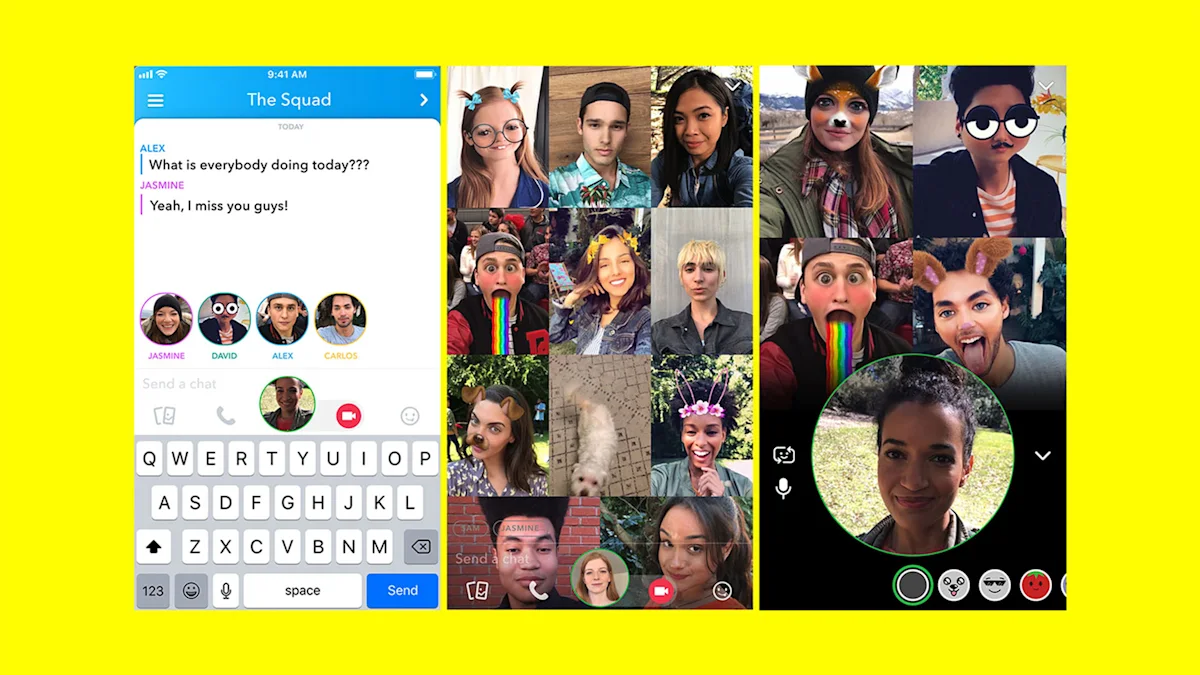
Lets a conference participant start a private audio conversation with another participant using a button on their video tile. The recipient continues receiving the main conference audio alongside the private channel.
LOW-LATENCY DELIVERY MECHANISM FOR MAP-BASED GUI
The system keeps friend-location data and a list of who may see each person's map icon. It can also vary how precisely different friends' locations are displayed.
GENERATING WEATHER DATA BASED ON MESSAGING SYSTEM ACTIVITY
The system learns to distinguish indoor from outdoor photos and videos. It combines that classification with temperature information in messages to estimate temperatures inside venues.
LOCATION-BASED SEARCH MECHANISM IN A GRAPHICAL USER INTERFACE
Lets users tap a location on a map to find public photos and videos posted nearby. The search area is centered on the selected location.
ASSIGNING PARTICIPANTS TO ROOMS WITHIN A VIRTUAL CONFERENCING SYSTEM
The system places participants into different virtual meeting rooms using room preferences and information about the participants. It then enables conferencing within the assigned rooms.
PROVIDING TEMPLATE ROOMS WITHIN A VIRTUAL CONFERENCING SYSTEM
Lets an organizer configure a reusable video-conference room template. A data file then generates multiple rooms using that template for different groups of participants.
CONFIGURING 360-DEGREE VIDEO WITHIN A VIRTUAL CONFERENCING SYSTEM
Lets a room designer configure participant video displays alongside a 360-degree video background or element. The conferencing system renders the room using those saved settings.
PROVIDING CONTACT INFORMATION WITHIN A VIRTUAL CONFERENCING SYSTEM
Participants in a virtual meeting room can offer their contact information through a button attached to another participant's video. The recipient must authorize viewing before the information is displayed.
UPDATING A ROOM ELEMENT WITHIN A VIRTUAL CONFERENCING SYSTEM
Lets users configure a virtual meeting room and change its elements while participants are meeting. Those changes update the room during the ongoing conference.
CONFIGURING BROADCAST MEDIA QUALITY WITHIN A VIRTUAL CONFERENCING SYSTEM
A conferencing-room designer can assign different video quality settings to different participant slots. When people join, their video feeds inherit the settings of their assigned slots.
PROVIDING A DOOR FOR A ROOM WITHIN A VIRTUAL CONFERENCING SYSTEM
Lets participants close or lock a virtual meeting room. Someone attempting to enter receives a notice that the room is closed or locked.
PROVIDING A TAKEABLE ITEM WITHIN A VIRTUAL CONFERENCING SYSTEM
A virtual-room designer marks certain objects as available for participants to take. During a conference, a participant can claim one of those objects and have it associated with them.
PROVIDING MIDI CONTROLS WITHIN A VIRTUAL CONFERENCING SYSTEM
A room designer assigns MIDI signals to changes in a virtual conferencing space. During a conference, matching signals can automatically change properties of room elements.
CONFIGURING A 3D MODEL WITHIN A VIRTUAL CONFERENCING SYSTEM
Lets someone configure a 3D object inside a virtual meeting room and choose imagery to project onto it. Participants then see the configured object during the meeting.
DYNAMICALLY ASSIGNING PARTICIPANT VIDEO FEEDS WITHIN VIRTUAL CONFERENCING SYSTEM
Lets a designer configure virtual meeting rooms with different numbers of video slots. During a meeting, it selects the appropriate room and assigns participants' video feeds to those slots.
LOCATION PRIVACY MANAGEMENT ON MAP-BASED SOCIAL MEDIA PLATFORMS
Shows selected users or geotagged posts at deliberately approximate locations. This lets the map display social activity without exposing its precise position.
IN-PERSON PARTICIPANT INTERACTION FOR HYBRID EVENT
Lets an organizer configure a physical event space and its virtual counterpart. In-person attendees use a companion application to interact with equipment while remote attendees see the venue’s live video.
PROVIDING CHANGE IN PRESENCE SOUNDS WITHIN VIRTUAL WORKING ENVIRONMENT
Detects when a participant becomes present or absent in a virtual workspace and plays a corresponding sound for selected colleagues.
RECREATING KEYBOARD AND MOUSE SOUNDS WITHIN VIRTUAL WORKING ENVIRONMENT
Recreates a participant's typing and mouse-click sounds for selected coworkers in a virtual workspace. It sends input timing rather than requiring the original sounds to be captured by a microphone.
PRESENTING TIME-LIMITED VIDEO FEED WITHIN VIRTUAL WORKING ENVIRONMENT
A participant in a virtual workspace selects a group of colleagues and sends them a temporary video feed. Each selected participant sees the feed within that workspace.
PRESENTING PARTICIPANT REACTIONS WITHIN A VIRTUAL WORKING ENVIRONMENT
An organizer divides participants in a virtual workspace into groups. Participants can select reaction buttons whose icons are displayed only to members of their assigned group.
COLLABORATIVE INTERFACE ELEMENT WITHIN A VIRTUAL CONFERENCING SYSTEM
Lets a room designer arrange participants' video panels and add shared interactive content. The designer can specify which participants may navigate or modify that content during a conference.
VIRTUAL PARTICIPANT INTERACTION FOR HYBRID EVENT
An organizer configures a physical event space and a corresponding virtual room. Remote attendees watch a live feed and send commands that interact with devices at the physical venue.
PRESENTING CAPTURED SCREEN CONTENT WITHIN A VIRTUAL CONFERENCING SYSTEM
A room designer separately configures participant video tiles and shared-screen presentation. The conferencing system then displays the room using those saved layout settings.
SELECTIVE LOCATION-BASED IDENTITY COMMUNICATION
A user selects a display option associated with their current location. That choice changes how their location or identity appears to other users on the map.
MAP-BASED GRAPHICAL USER INTERFACE INDICATING GEOSPATIAL ACTIVITY METRICS
Shows where people are posting Snaps on a map. Heatmap colors indicate areas with concentrated or unusually high posting activity.
PROVIDING BOT PARTICIPANTS WITHIN A VIRTUAL CONFERENCING SYSTEM
Lets a virtual-conference designer configure video tiles and populate them with simulated participants. The resulting preview shows how the space would look with those participants present.
PRESENTING PARTICIPANT REACTIONS WITHIN A VIRTUAL CONFERENCING SYSTEM
Participants can press a reaction button to show icons and play reaction sounds for everyone in a call. When reactions arrive rapidly, the system changes the audio output.
ADMINISTRATOR-BASED NAVIGATING OF PARTICIPANTS BETWEEN ROOMS WITHIN A VIRTUAL CONFERENCING SYSTEM
Lets a conference administrator move attendees between virtual rooms. Ordinary attendees can navigate themselves but cannot relocate other participants.
MAP-BASED GRAPHICAL USER INTERFACE FOR MULTI-TYPE SOCIAL MEDIA GALLERIES
Snap Map displays different kinds of local public Stories using visually distinct icons. Tapping an icon plays a collection of location-tagged Snaps contributed by multiple people.
MAP-BASED GRAPHICAL USER INTERFACE INDICATING GEOSPATIAL ACTIVITY METRICS
Shows where people are posting Snaps on a map. Heatmap colors indicate areas with concentrated or unusually high posting activity.
PRESENTING PARTICIPANT CONVERSATIONS WITHIN VIRTUAL CONFERENCING SYSTEM
Appears to present participants' conversations within a virtual calling interface. The supplied record does not specify whether these are text conversations, speech displays, or another conversation presentation.
PRESENTING PARTICIPANT REACTIONS WITHIN VIRTUAL CONFERENCING SYSTEM
Appears to show participant reactions during a virtual conference. The supplied title does not establish whether reactions are manually selected or inferred from participants' behavior.
METHODS AND SYSTEMS FOR SELECTING USER GENERATED CONTENT
Screens user photos made with sponsored filters and selects suitable submissions for a promotional highlight reel. Brands can showcase how people actually use their filters.
VIDEO COMPRESSION SYSTEM
Instead of transmitting every video frame, the system sends an initial image and subsequent sets of tracked points. The receiving device uses those points to animate the image, reducing the amount of transmitted data.
VIDEO COMPRESSION SYSTEM
Instead of transmitting every video frame, the system sends an initial image and subsequent sets of tracked points. The receiving device uses those points to animate the image, reducing the amount of transmitted data.
MIXING PARTICIPANT AUDIO FROM MULTIPLE ROOMS WITHIN A VIRTUAL CONFERENCING SYSTEM
Lets a virtual meeting-room designer choose whether audio from other rooms should be heard in the current room. The conferencing system combines those audio streams according to the selected settings.
PRESENTING OVERVIEW OF PARTICIPANT CONVERSATIONS WITHIN A VIRTUAL CONFERENCING SYSTEM
Lets an administrator preview several video conference rooms at once. Each room's preview includes metrics about the conversation taking place there.
ASSIGNING PARTICIPANTS TO ROOMS WITHIN A VIRTUAL CONFERENCING SYSTEM
The system places participants into different virtual meeting rooms using room preferences and information about the participants. It then enables conferencing within the assigned rooms.
BREAKOUT SESSIONS BASED ON TAGGING USERS WITHIN A VIRTUAL CONFERENCING SYSTEM
Assigns tags to conference attendees and uses those tags to form breakout groups. An organizer associates each group with a virtual room and configures its session.
ADMINISTRATOR-BASED NAVIGATING OF PARTICIPANTS BETWEEN ROOMS WITHIN A VIRTUAL CONFERENCING SYSTEM
Lets a conference administrator move attendees between virtual rooms. Ordinary attendees can navigate themselves but cannot relocate other participants.
COMMUNICATING WITH A USER EXTERNAL TO A VIRTUAL CONFERENCE
Lets someone designing a virtual meeting room place an interactive object that contacts a person outside the meeting. Selecting that object initiates communication using its configured settings.
UPDATING ELEMENT PROPERTIES BASED ON DISTANCE BETWEEN ELEMENTS IN VIRTUAL CONFERENCE
A room designer specifies how one virtual element changes another when their distance changes. During a conference, those rules automatically update the affected element's appearance or other properties.
PRESENTING OVERVIEW OF PARTICIPANT REACTIONS WITHIN A VIRTUAL CONFERENCING SYSTEM
Participants select reaction buttons during a virtual conference. The system saves those reactions alongside the recording and produces a graphical overview showing reactions over time.
PROVIDING SIDE CONVERSATIONS WITHIN A VIRTUAL CONFERENCING SYSTEM
Lets a conference participant start a private audio conversation with another participant using a button on their video tile. The recipient continues receiving the main conference audio alongside the private channel.
AUTOMATICALLY NAVIGATING BETWEEN ROOMS WITHIN A VIRTUAL CONFERENCING SYSTEM
Lets a conference participant request permission to follow another participant between virtual rooms. Once authorized, room navigation automatically keeps them together.
PRESENTING PARTICIPANT REACTIONS WITHIN A VIRTUAL CONFERENCING SYSTEM
Participants can press a reaction button to show icons and play reaction sounds for everyone in a call. When reactions arrive rapidly, the system changes the audio output.
CONFIGURING PARTICIPANT VIDEO FEEDS WITHIN A VIRTUAL CONFERENCING SYSTEM
Lets a room designer set the appearance and placement of participant video elements. During a conference, participants' live feeds are assigned to those predefined elements.
PROVIDING A ROOM PREVIEW WITHIN A VIRTUAL CONFERENCING SYSTEM
Lets participants in one virtual meeting room see a live preview of another room and hear its audio through a separate channel. This describes a multi-room conferencing concept rather than ordinary Snapchat group calling.
MIXING PARTICIPANT AUDIO FROM MULTIPLE ROOMS WITHIN A VIRTUAL CONFERENCING SYSTEM
Lets a virtual meeting-room designer choose whether audio from other rooms should be heard in the current room. The conferencing system combines those audio streams according to the selected settings.
AUTOMATICALLY NAVIGATING BETWEEN ROOMS WITHIN A VIRTUAL CONFERENCING SYSTEM
Lets a conference participant request permission to follow another participant between virtual rooms. Once authorized, room navigation automatically keeps them together.
PRESENTING OVERVIEW OF PARTICIPANT REACTIONS WITHIN A VIRTUAL CONFERENCING SYSTEM
Participants select reaction buttons during a virtual conference. The system saves those reactions alongside the recording and produces a graphical overview showing reactions over time.
CONFIGURING PARTICIPANT VIDEO FEEDS WITHIN A VIRTUAL CONFERENCING SYSTEM
Lets a room designer set the appearance and placement of participant video elements. During a conference, participants' live feeds are assigned to those predefined elements.
ADMINISTRATOR-BASED NAVIGATING OF PARTICIPANTS BETWEEN ROOMS WITHIN A VIRTUAL CONFERENCING SYSTEM
Lets a conference administrator move attendees between virtual rooms. Ordinary attendees can navigate themselves but cannot relocate other participants.
COMMUNICATING WITH A USER EXTERNAL TO A VIRTUAL CONFERENCE
Lets someone designing a virtual meeting room place an interactive object that contacts a person outside the meeting. Selecting that object initiates communication using its configured settings.
PROVIDING SIDE CONVERSATIONS WITHIN A VIRTUAL CONFERENCING SYSTEM
Lets a conference participant start a private audio conversation with another participant using a button on their video tile. The recipient continues receiving the main conference audio alongside the private channel.
PRESENTING PARTICIPANT REACTIONS WITHIN A VIRTUAL CONFERENCING SYSTEM
Participants can press a reaction button to show icons and play reaction sounds for everyone in a call. When reactions arrive rapidly, the system changes the audio output.
ASSIGNING PARTICIPANTS TO ROOMS WITHIN A VIRTUAL CONFERENCING SYSTEM
The system places participants into different virtual meeting rooms using room preferences and information about the participants. It then enables conferencing within the assigned rooms.